Zoominator: Cursor Zoom & Follow Plugin for OBS
Free OBS Studio plugin that zooms and follows your mouse cursor with smart clamping, click highlights and wheel zoom. Ideal for tutorials and coding.
- OBS Studio
- Windows
- macOS
- Linux
From discovery to your next broadcast
Plan your setup
Check compatibility
Listed platforms: OBS Studio, Windows, macOS, Linux. Confirm the required versions and dependencies before installing.
Preview before going live
Use a separate test scene or project. Check readability, timing and performance with your own layout and recording settings.
Make it your own
Follow the setup instructions below, check the creator’s license and save a working configuration before changing your broadcast.
A closer look
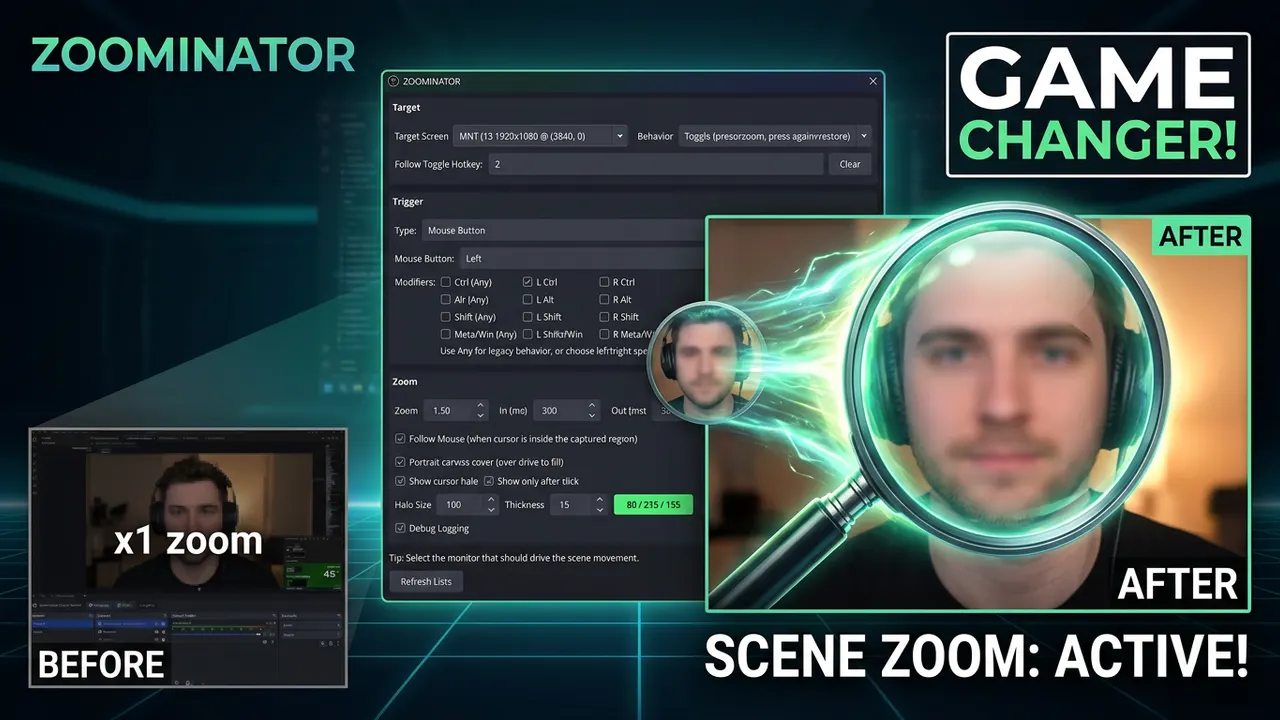
Zoominator is a free, open-source OBS Studio plugin that automates zooming. It zooms and pans the whole scene toward your mouse cursor, so viewers always see the detail you are pointing at, without rebuilding your scenes. It works as an extra camera layer above what you already have.
At a glance
- Resource type: Plugin.
- Listed platforms: OBS Studio, Windows, macOS, Linux.
- Source: GitHub releases and repository. Check current requirements and license terms there.
Features
- Scene-wide zoom and pan that follows the mouse smoothly.
- Smart clamping keeps the view inside the canvas, including corners and edges.
- Ultrawide edge tracking and support for vertical canvases.
- Idle freeze holds the view steady when the mouse stops.
- Click highlight (halo) shows viewers where you click.
- Flexible activation by hotkey, plus mouse wheel zoom on Windows and Linux X11.
Compatibility
- Windows: full support, including global input and wheel zoom.
- macOS: requires Accessibility permission for input tracking.
- Linux: supported on X11; native Wayland sessions need compositor-specific input support.
Built for
Coding streams, software tutorials, design work, spreadsheets and any screen capture where small text needs to be readable on stream.
Get started
Download the release for your system from GitHub, install it and restart OBS Studio. Add Zoominator to your scene, set an activation hotkey and adjust the zoom level and follow speed, then test it on your usual screen capture.
Files and license
Free and open source. The GitHub releases page has the latest builds for each platform, and the repository includes the license.